Subscription Center
Keep creating without limits
Pick a creator plan and get credits, faster generation, and member tools.
Member benefits
Faster generation
Music engine
Creator tools
Agent support
HD audio
Commercial use
$19.99/ Pro
Have feedback on our plans? Submit feedback or email us at support@musicmake.ai
Compare Plans
| Basic | 🔥 Popular Pro | High volume Max | |
|---|---|---|---|
| Generation | |||
| Monthly quota | 900 credits / 75 generations / ~150 tracks | 1900 credits / 158 generations / ~316 tracks | Massive monthly credit pool |
| Processing tier | Standard | Faster | Highest available |
| Concurrent workflow capacity | 1 | More | Most |
| Audio Features | |||
| Audio length allowance | Standard | Extended | Highest |
| WAV / high-quality export | |||
| Stem tools | |||
| Replace Section | |||
| Upload your own audio | |||
| Extend generated songs | |||
| AI Cover Song | |||
| Add Tracks | |||
| License & Support | |||
| Commercial-use rights | |||
| Generation Certificate | |||
| Agent Pro workflow | |||
| Custom Voice | |||
| Support Service | Email Support | Priority Email | VIP 1-on-1 Manager |
| Cloud Storage | |||
← Scroll to view more →
Commercial-use License and Generation Records
Eligible paid plans include a commercial-use license and a downloadable generation certificate for your records. Usage rights may depend on your plan, inputs, and local law.
Plan-based Usage Rights
Commercial-use License
Downloadable Generation Certificate
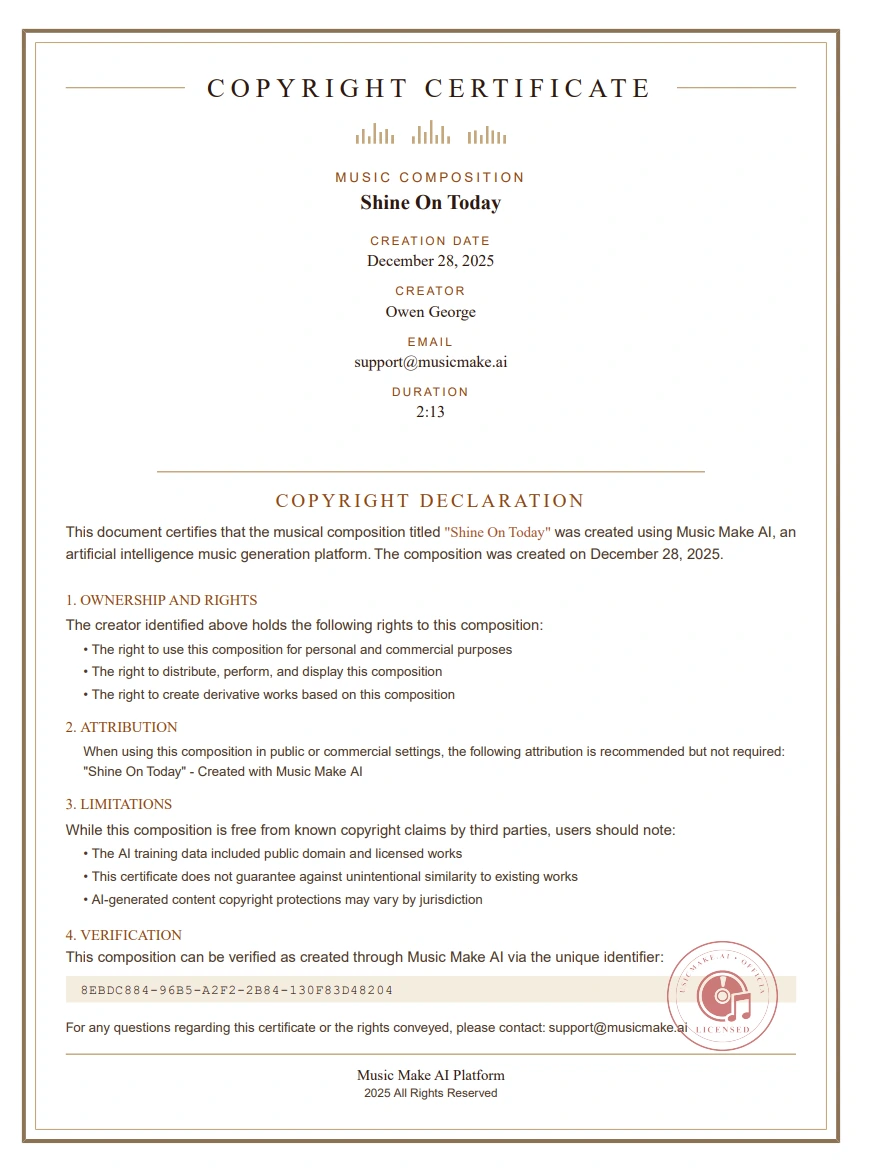
VerifiedLicense Record
Frequently Asked Questions
Quick answers to help you decide
1
Can I use the music commercially?
Eligible paid plans include commercial-use rights for generated tracks. You can use them for YouTube, client work, ads, games, and podcasts according to your plan and MusicMake.ai's license terms.
2
What usage rights do I get?
Your plan defines the usage rights, export options, and license documentation available for generated tracks. Copyright treatment for AI-generated music may vary by jurisdiction and by the material you provide.
3
How long does generation take?
About 1 minute. You get 2 tracks each time — pick your favorite.
4
What audio formats can I download?
MP3 and WAV. High quality, ready to use.
5
Is there a free trial?
Yes. New users get free trial credits. No card needed. Try it now, decide later.
6
What's the difference between Free and Pro?
Pro gives you more credits, longer tracks, advanced tools, priority queue access, and commercial-use options. Free gives you trial credits to test. Visit our pricing page to compare.
7
Can I cancel anytime?
Yes. One click from your dashboard. No questions asked.
8
Will I get the same result twice?
Each generation can produce a different result, even from the same prompt. If a version is close, you can keep shaping it with edits, covers, extensions, and other tools.
9
What genres are supported?
Pop, rock, electronic, hip-hop, jazz, classical, ambient, cinematic, lo-fi — and more. You can blend genres or describe custom styles.
10
How do credits work?
12 credits = 1 standard generation = 2 tracks. Basic includes 900 credits/month (75 generations / about 150 tracks). Pro includes a larger monthly quota that depends on the selected tier. Credits refresh monthly.
11
Does MusicMake.ai have an app? Can I use it like an app?
We do not have a standalone app yet, but you can add MusicMake.ai to your home screen for an app-like experience. On iPhone or iPad, open the website in Safari, tap Share, then choose "Add to Home Screen". On Android in Chrome, open the menu and choose "Add to Home screen" or "Install app". On desktop in Chrome or Edge, use the install icon in the address bar when it appears.
Still have questions?
