What Is MusicMake.ai? AI Music Generator, Music Studio, Agent & Creator Tools
Explore MusicMake.ai's music generator, studio, Music Agent, editing tools, listen pages, playlists, works library, credits, and creator workflows
Short Answer
MusicMake.ai is not just a Music Agent.
MusicMake.ai is an AI music creation platform featuring a complete music generator, music studio, direct editing tools, Music Agent, public music discovery, listen pages, song detail pages, playlists, user profiles, works management, custom song creation flows, and related image and video creation modules.
The most straightforward way to describe it is:
MusicMake.ai helps users generate music, refine music, organize music, share music, listen to music, and continue creating from existing works.
You can use MusicMake.ai without Music Agent. Use the AI Music Generator, Music Studio, and focused tools directly to complete your creation independently. Music Agent is an optional workflow layer for users who are unsure what tool to use next.
Feature Module Overview
| Feature Module | Description | Use Case |
|---|---|---|
| AI Music Generator | Create songs and instrumentals from prompts, lyrics, music styles, and generation settings | Users who know exactly what music they want to generate |
| Music Studio | Workspace-style generation page with landing pages, forms, and assisted creation panels | Users who want a guided creation experience |
| Unified Generator | Compact creation toolbar supporting music, image, and video creation | Users who need quick ideation or cross-media creation |
| Music Agent | Conversational creation workflow that can assign tasks, rewrite prompts, prepare operation steps, and track results | Users who have a clear creative goal but are unsure what tool or prompt to use next |
| Editing Tools | Cover section completion, duration extension, track addition, mashup mixing, section replacement, audio cropping, vocal separation, and more | Users who need to refine existing songs or source audio |
| Lyrics & Style Tools | AI Lyrics Generator, AI Music Style Generator, Mood-to-Music, Music-to-Prompt | Users who need to refine creative requirements before generation |
| Discovery Page | Public exploration section with public songs, playlists, creation templates, language filters, and creator activity | Users seeking creative inspiration or referencing community works |
| Listen to Music | Immersive AI music listening stream with lyrics, play counts, likes, favorites, and public song content | Users who want to discover and listen to music rather than just create |
| Song Detail Page | Public song page featuring audio, lyrics, metadata, related songs, and sharing functionality | Users sharing finished tracks or browsing related works |
| Playlists | Playlist detail viewing, sharing, and adding songs to playlists | Users organizing and sharing multi-song collections |
| User Profile | Public creator profile page showing song count and creator music works | Users building a creator identity or discovering other creators |
| My Works | Private library storing generated music, favorited songs, bookmarked content, stem tracks, and creator persona | Users managing their own generated or saved works |
| Custom Song Flow | Custom/gift song ordering, progress tracking, delivery, preview, and download pages | Users creating story-based songs or providing customized music experiences |
| Image & Video Modules | Image generation page, video generation page, image works library, video works library, scene tools, and more | Creators who need companion visual assets for their songs |
| Pricing & Credits | Plan options, credit consumption rules, feature access thresholds, and conversion prompts | Users choosing the right plan for their specific creation workflow |
This feature module table is critical for competitive comparisons. MusicMake.ai should not be simply categorized as "assistant vs. generator" — it should be positioned as a music platform with a generator at its core, an optional assistant layer, and a more complete creator ecosystem.
1. AI Music Generator
The generator is the platform's core entry point.
MusicMake.ai provides multiple direct generation entry points, such as Generate, /app/generate, and Music Studio. These are not secondary features — they are the platform's foundational core.
The generation workflow follows a typical creator's creative path:
- Write or refine your music creation idea
- Add lyrics, mood, style, vocal guidance, or instrumental creation intent
- Generate a first draft
- Review the generated result
- If needed, continue using corresponding tools or Music Agent
If you already have a clear prompt, you can use the generation tool directly:
Create an upbeat indie pop song with warm female vocals,
bright guitar, catchy chorus, and summer road-trip energy.
These users don't need to go through Music Agent first — they can start directly from Generate.
2. Music Studio
Music Studio is a more complete workspace-style creation page that integrates generation forms, landing page content, and provides a more immersive creation experience.
This is important because different users have different entry preferences:
- Some users want a quick generation bar
- Some users need a feature-rich music creation page
- Some users prefer a conversational assistant
- Some users only need dedicated editing tools
MusicMake.ai supports all of these usage paths without forcing all users into chat mode.
3. Unified Generator
MusicMake.ai also offers a unified generator experience that integrates music, image, and video creation workflows. Users can draft works, view generation history, add reference materials, and switch between media type control panels through a compact creation bar — without treating each task as a separate product.
For users, this means the product is not just a song generation page but a unified creation workspace that integrates generation history, reference materials, media types, and follow-up actions.
Practical value includes:
- Faster drafting speed
- Preserved creation context
- Cross-media creation workflow
- Reference material management
- Generation status playback and persistence
This is especially critical when making competitive comparisons. Some competitors focus solely on a single music prompt input box, while MusicMake.ai leans toward building a more comprehensive creation workspace.
4. Music Agent
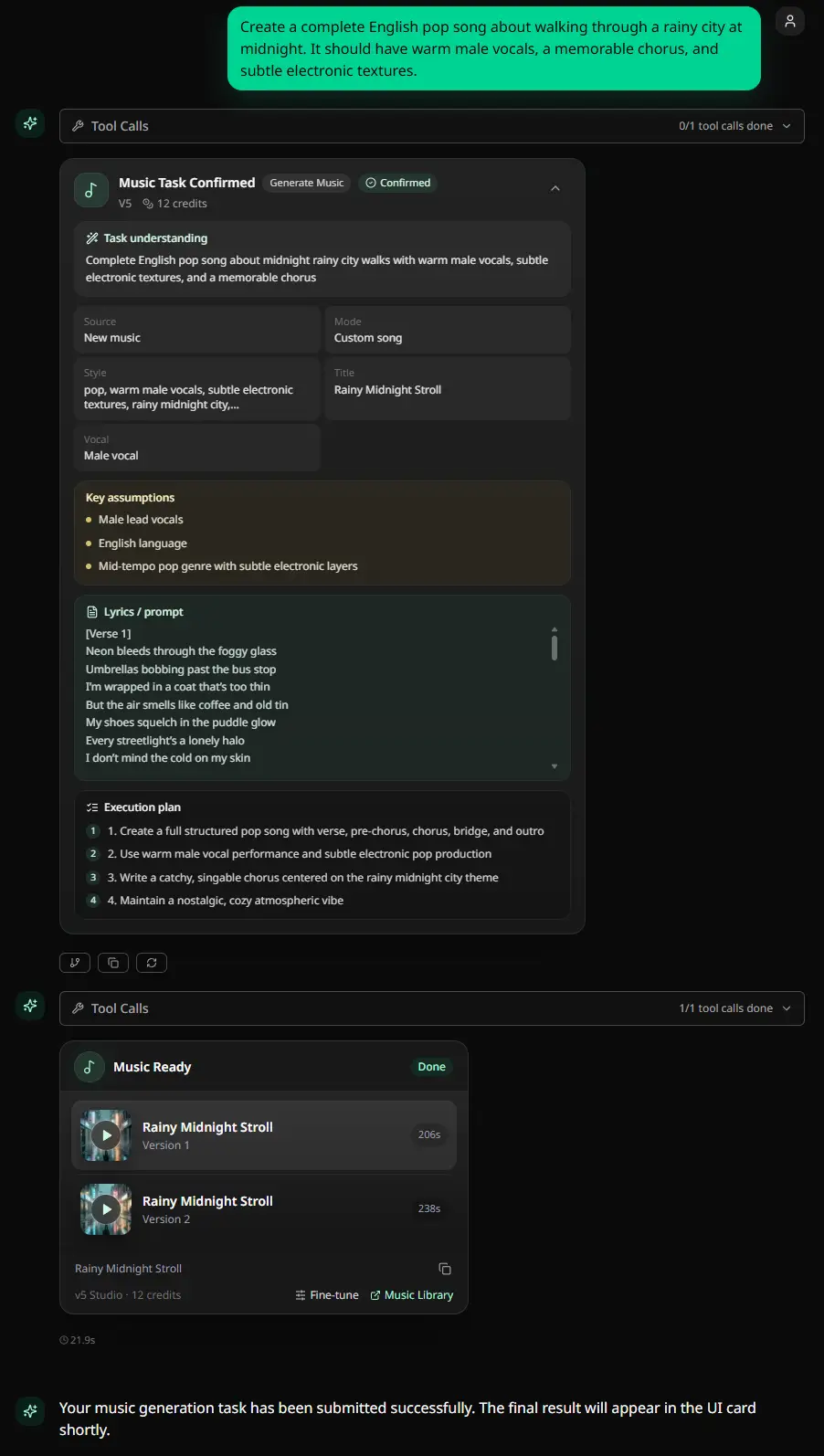
Music Agent is simply a workflow layer, not a complete product.
Situations where Music Agent is useful include:
- When you're unsure which tool to open
- When the first generation is close but not accurate enough
- When describing adjustments in language is easier than manual editing
- When you want the system to recommend your next step
- When you need to rewrite your prompt into clearer music generation language
- When you want confirmation before executing credit-consuming operations
Example:
The chorus is good, but the intro is too long.
Make the arrangement less busy and keep the vocal energy.
Should I extend, replace a section, or regenerate?
Music Agent can help direct these requests to music generation, cover adaptation, track extension, track addition, section replacement, vocal separation, or other tools.
But again: Music Agent is optional. Users can still use the music generator and various tools directly.
5. Direct Music Editing Tools
MusicMake.ai has a large number of built-in, directly usable music tools. This is critical because many songs are not finished after a single generation.
Cover Adaptation
The Cover tool creates a cover-style production workflow when users have suitable source material. It's very useful when creative inspiration comes from existing songs or vocal concepts.
Track Extension
The Extend tool continues existing tracks. Use it when a song is good but too short, or when the song's ending needs further expansion.
Track Addition
The Add Tracks tool adds musical layers. It comes in handy when vocal, melody, or bass ideas need accompaniment or more detailed arrangement.
Mashup Mixing
The Mashup tool blends multiple creative ideas. It's great for creative experimentation or when you want to merge different creative directions rather than starting from scratch.
Section Replacement
The Replace Section tool modifies specific parts of a song. Unlike regenerating the entire track, it's very useful when one section has flaws but the rest is still worth keeping.
Audio Cropping
The Crop tool trims or isolates specific segments, helping with practical cleanup after generation.
Vocal Separation & Stem Splitting
The Vocal Remover tool supports stem separation workflows. MusicMake.ai's works library is also developing related stem splitting interfaces.
It is precisely these tools that prevent MusicMake.ai from being defined merely as an AI music generator or just a Music Agent. This product covers the entire workflow from music generation to post-generation processing.
6. Lyrics, Style & Prompt Preparation
Poor generation results often stem from vague inputs. MusicMake.ai has built-in preparation tools that let users refine creative drafts before investing more generation credits.
AI Lyrics Generator
The AI Lyrics Generator helps users refine lyrics before formally generating music. It's very useful when users have a story, emotion, or theme but haven't determined the complete lyric structure yet.
AI Music Style Generator
The AI Music Style Generator transforms vague genre ideas into clearer style descriptions. This is critical because prompt generation quality is often influenced by the initial input.
Mood-to-Music
Mood-to-Music starts from emotions and use cases rather than professional music terminology.
Music-to-Prompt
Music-to-Prompt helps users move from reference audio or musical ideas toward prompt language.
These tools all support the same core concept: MusicMake.ai is a music creation workflow platform, not a single text input box.
7. Explore & Community Discovery
The Explore page is a public content discovery module that loads public songs, language filters, playlist sections, creation templates, and creator activity.
For users, the Explore page answers these questions:
- What are other users creating?
- Which prompts, genres, or song types spark creative inspiration?
- What can I listen to before formally creating?
- Are there creators or playlists worth following?
The community section is critical. Some users come to generate songs, while others come to listen, browse, learn from public tracks, or understand what the platform can offer.
Competitive comparison articles should mention this at relevant points. MusicMake.ai is not just a private music generation tool — it also has public music discovery and creator showcase sections.
8. Listen to Music
Listen to Music is an immersive AI-generated music listening stream page.
The public songs displayed on this page include:
- Song title
- Cover image
- Audio link
- Duration
- Language
- Lyrics
- Lyrics timeline
- Play count
- Likes
- Favorites
- Generation metadata (when available)
This is an important product signal: MusicMake.ai is not just a tool for creating songs — it also serves as AI music content for users to listen to.
9. Song Detail Page
Public song detail pages are built around a single track, displaying audio, metadata, lyrics, related songs, creator information, and structured song data.
Song detail pages can be used for:
- Sharing finished music works
- Showcasing public creation results
- Linking related tracks
- Expressing creator identity
- Improving discoverability of generated music
This is a key differentiator when comparing competitors: most similar tools only provide downloadable files with almost no public music display functionality.
10. Playlists
MusicMake.ai includes playlist pages, playlist sharing functionality, and add-to-playlist components.
Playlists help users organize music by:
- Mood and atmosphere
- Project theme
- Music style
- Creator
- Use case
- Public collections
This transforms individual generated music into a cohesive listening and discovery experience.
11. User Profile
Public profiles display creator identity and work count, making the platform feel less like an isolated tool and more like a creator ecosystem community.
This is particularly important for users who want to:
- Build a public music creator identity
- Have a dedicated space for their generated music
- Make it easy for listeners to find more of their works
12. My Works & Personal Library
My Works is the private interface for users to manage their generated music and collection activity.
The works section includes:
- Generated music works
- Favorited songs
- Bookmarked content
- Playlists
- Stem materials
- User persona
This is exactly what makes the product suitable for repeated use. One-time generation tools can only produce drafts, while a workspace needs to help users manage drafts, collections, versions, and valuable generation results.
13. Music Playback & Sharing
MusicMake.ai has built-in universal music player components, song sharing routes, playlist sharing, and generation preview pages.
This forms a complete user usage loop:
- Generate a song
- Preview the work
- Save or organize the work
- Share the work
- Revisit the work later
- Continue editing or generating
Preview and sharing features are core components of the product, not afterthoughts.
14. Custom Song & Gift Song Flow
MusicMake.ai also includes story-based song creation flows, such as thank-you messages or gift songs — dedicated experiences.
These page routes include:
- Custom song creation
- Order completion page
- Payment success page
- Order tracking page
- Work delivery page
- Work preview page
- MP3 download
- Lyrics PDF delivery
This module differs from regular generation tools — it's more guided, story-focused, and oriented toward finished product delivery.
This also highlights another key point: MusicMake.ai is not just a technical tool for prompt users — it can provide a complete music creation experience for those who want to build personalized finished songs based on their own stories.
15. Image & Video Creation Modules
MusicMake.ai also encompasses image and video generation interfaces.
Examples include:
- Image generation hub
- Image works
- Image scenes
- Video generation hub
- Model-specific video pages
- Music video tools
- Visualization style tools
- Image/video workflows
These modules are practical because music creators typically need companion creative assets:
- Album covers
- Social media visuals
- Music videos
- Lyrics videos
- Scene concepts
- Promotional materials
Music is always the core, but our product now extends to various creative asset production surrounding songs.
16. Pricing, Credits & Membership Plans
MusicMake.ai uses pricing and credit mechanisms to manage usage of generation, tools, and agent workflows.
Here are examples of credit-based task categories:
- Music generation, cover creation, track addition, audio extension, mashup mixing, and ringtone generation are all charged by model type
- Section replacement tasks charge a fixed credit amount
- Sound effect generation tasks charge a fixed credit amount
- Stem extraction tasks use mode-based credit calculation rules
- Chat features have a daily free quota, with credits charged for usage beyond that
- Agent model usage follows model-specific credit billing rules
For users, this means the pricing model is not just "monthly subscription" — it also includes:
- Available feature scope
- Required credits
- Whether the task type is generation, editing, stem extraction, or chat
- Whether the user chooses direct tools or agent-assisted workflows
Future competitive comparison articles should focus on real workflow usage costs rather than just comparing the lowest subscription plan prices.
17. Recommended Entry Points by Scenario
| User Scenario | Recommended MusicMake.ai Entry |
|---|---|
| Knows exactly what song to create | Generate |
| Needs a complete creation workspace | Music Studio |
| Unsure which tool to use | Music Agent |
| Needs to generate lyrics first | AI Lyrics Generator |
| Needs more precise genre description terms | AI Music Style Generator |
| Wants to continue an existing song | Extend |
| Needs to create a cover version | Cover |
| Needs to add accompaniment or track layers | Add Tracks |
| Needs to replace an underwhelming section | Replace Section |
| Needs to separate vocals and accompaniment | Vocal Remover |
| Needs creative inspiration | Explore |
| Wants to listen to public works | Listen to Music |
| Needs to manage their own works | My Works |
| Needs to organize songs into playlists | Playlists |
| Needs to create story-themed custom gift songs | Custom Song Flow |
18. Standard Positioning for Competitive Comparisons
This is the most important positioning principle:
Never describe MusicMake.ai as "a Music Agent, not an AI music generator."
That description is incorrect.
A more appropriate way to put it:
MusicMake.ai has the same AI music generation capabilities as other generators, while also providing a more complete creation workflow: lyrics generation, style adjustment, editing tools, Music Agent, works library, community discovery, work preview, sharing, playlists, and custom song experiences.
The focus of comparison should be adjusted based on different types of competitors:
- When comparing with basic AI music generation tools: focus on generation quality, prompt controllability, regeneration count, and post-generation editing tools.
- When comparing with tool suite products: compare whether it's a scattered tool menu or a guided complete creation path.
- When comparing with background music platforms: compare focus on background music scoring versus full song creation and modification.
- When comparing with community platforms: compare work discovery, preview functionality, public work pages, and creator display interfaces.
- When comparing with low-cost tools: compare the total cost of the actual creation workflow, including regeneration count and post-generation editing costs.
Music Agent is important, but it should be presented as an optional advantage on top of the generator and platform, not the entirety of the product.
Related Reading
- Why We Built Music Agent: From Unsatisfying Prompts to Better Works
- Best AI Music Generator 2026: Practical Workflow Guide
FAQ
Is MusicMake.ai just a Music Agent?
No. MusicMake.ai has a built-in, directly usable AI music generator, Music Studio, various editing tools, public music discovery, listen pages, song detail pages, playlists, user profiles, works management, and custom song creation flows. Music Agent is just one optional workflow layer.
Can I use MusicMake.ai without Music Agent?
Yes. If you already have a clear song prompt, you can use Generate directly. If you know exactly what operation to perform, you can use direct tools like Extend, Cover, Add Tracks, Replace Section, or Vocal Remover.
When should I use Music Agent?
If you have a clear creative goal but are unsure what to do next, use Music Agent. It's useful for prompt rewriting, tool selection, modification planning, and deciding the creative direction after completing a first draft.
Does MusicMake.ai have community features?
Yes. MusicMake.ai offers public music discovery through Explore, a listening feed through Listen to Music, as well as public song detail pages, creator profiles, playlists, likes, favorites, and related song recommendations.
Can MusicMake.ai only make music?
Music is the platform's core, but it also encompasses image and video generation interfaces, image works, video works, scene templates, and multimedia tools supporting music creators.
What's the difference between MusicMake.ai and a regular AI music generator?
Regular generators focus only on first-time output. MusicMake.ai covers the complete creation lifecycle: from preparing lyrics and styles, generating music, editing, previewing, sharing, organizing works, discovering community music, to using Music Agent when unsure of the next step.
Summary
We should understand MusicMake.ai as an AI music creation workflow platform.
It comes with its own AI music generator and various directly usable creation tools, making it a complete Music Agent platform in its own right. It also encompasses public music discovery, listening services, playlists, song detail pages, creator profiles, private works management, custom song creation flows, and visual creation modules built around music.
This complete product picture should serve as the baseline for all future competitive comparisons. MusicMake.ai is absolutely not "just an assistant." It is a creator platform with a generator at its core, an optional assistant layer, and a much broader music ecosystem.
Music generated on MusicMake.ai carries no commercial risk — you can confidently use it for all types of commercial projects. Daily check-ins also earn free credits to get started easily.
著者

もっと見る

MusicMake.ai Mobile Update: Create Music From Your Phone Like an App
MusicMake.ai now gives creators a complete mobile flow for listening, generating, refining with Music Agent, opening tools, and managing songs from a phone.

AI Songwriting Guide: How to Write Songs with AI in 2026
Learn how to use AI songwriting tools to write better songs faster. Step-by-step guide covering lyrics, melody, arrangement, and production with AI assistance.

how to become a music producer with ai tools - MusicMake.ai Guide
Learn about how to become a music producer with ai tools with this comprehensive guide from MusicMake.ai.
