
MusicMake.ai outperforms Suno for multi-step song editing
Discover why MusicMake.ai beats Suno in multi-step song editing — with Music Agent guidance, prompt repair, song extension, cover creation, section editing, and project archiving.
Quick Answer
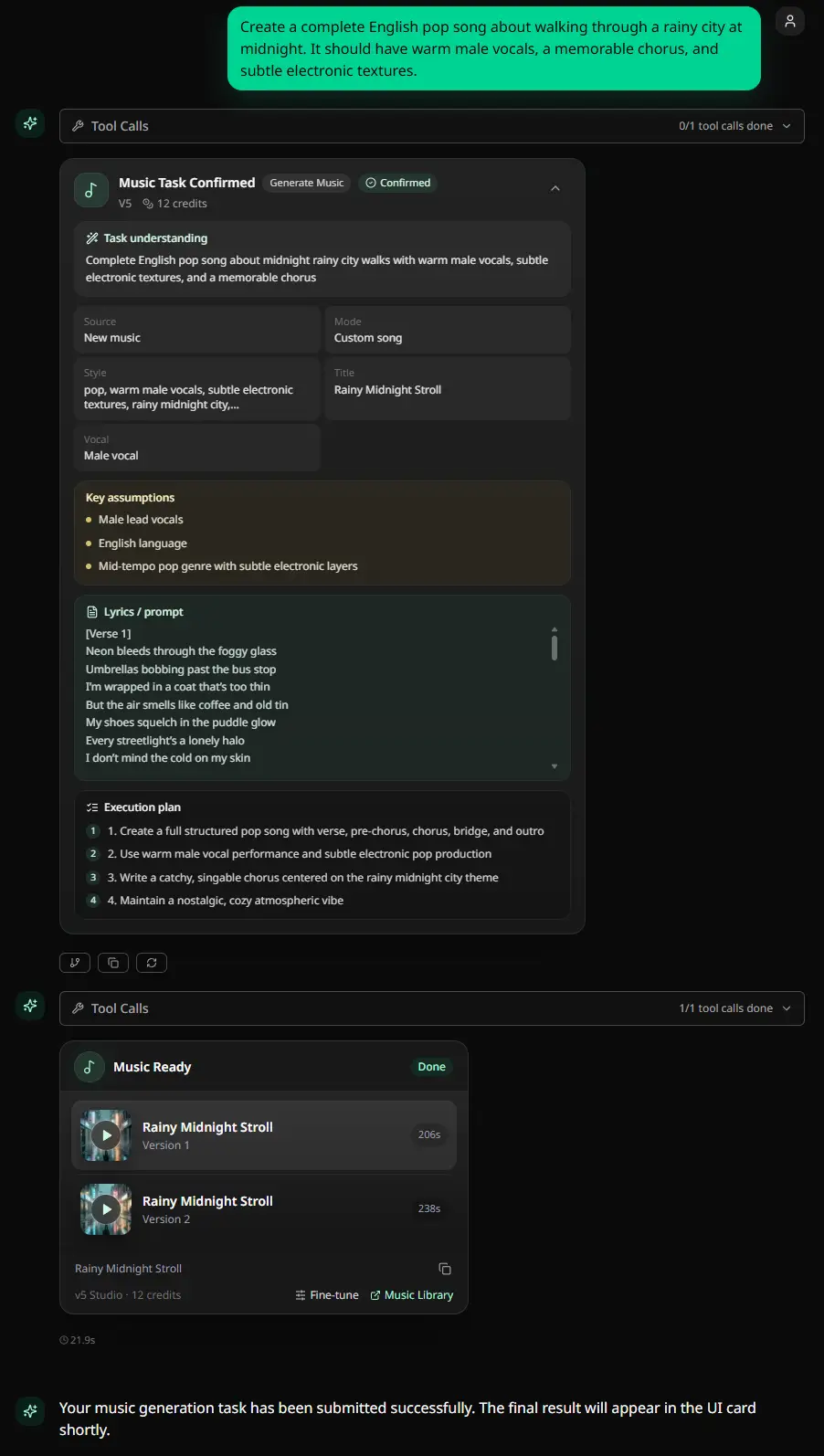
MusicMake.ai is better suited than Suno for executing multi-step song editing workflows with the support of a richer MusicMake.ai toolset.
This doesn't mean Suno is weak. Suno itself is a top-tier AI music generation tool, and its current pricing page includes many editing-related features: song remixing, duration extension, cover adaptations, playback speed adjustment, adding vocal or instrumental parts, replacing or adding sections, extracting stems if eligible per subscription plan, creating with your own voice, and using custom audio uploads to tune the exclusive effects of version 5.5.
The difference lies in workflow design. Suno's terms of service also mention Suno Chat, which allows creation and optimization within Suno. But MusicMake.ai's focus is completely different: relying on Music Agent, direct editing tools, source-based operations, and a guided process from feedback to the next step using MusicMake.ai tools. If what you need is "create a better first draft of a vocal song," then Suno is more suitable. But if your problem is "this track already has a basic form, now I need to fix, extend, delete, add, replace, organize, or archive it in the workspace," then MusicMake.ai is usually the better choice.
Objective Comparison
| Use Case | Better Suited Tool |
|---|---|
| Quickly generate Suno-style vocal song ideas | Suno |
| Lowest publicly available paid entry price | Suno |
| Native Suno model style and experience | Suno |
| Turn vague feedback into actionable next steps | MusicMake.ai |
| Choose the right follow-up editing tool | MusicMake.ai |
| Cover, extend, mashup, mix, add tracks, replace sections, or support vocal removal based on source material (requires copyright of source material) | MusicMake.ai |
| Create multiple adapted versions for clients or video projects | MusicMake.ai |
| Preserve copyright and revision history | MusicMake.ai |
The truly valuable question is not "which tool is overall better?", but: What do you do when the first generation isn't good enough?
Suno's Strengths
We should look at Suno objectively; it's definitely not a one-click toy.
As of June 14, 2026, and refreshed in Chrome on June 15, the Suno pricing page included the following:
- Free plan: 50 daily credits that auto-refresh, max 10 songs per day, not for commercial use.
- Pro plan: 2500 credits per month, commercial use for songs generated within the plan, $8/month billed annually, $10/month billed monthly.
- Premier plan: 10000 credits per month, includes Suno Studio, all Pro benefits, $24/month billed annually, $30/month billed monthly.
- Various editing and creation features: advanced editing, separating songs into vocal and instrumental stems, adding vocal or instrumental parts, song remixing, duration extension, cover adaptation, playback speed adjustment, replacing or adding sections, extracting stems, recording or uploading your own voice for creation, and tuning v5.5's exclusive effects with custom audio uploads.
References: Suno Pricing Page, Suno Terms of Service, and Suno Help Article on Retroactive Commercial Use.
So the core argument of this article is not that "Suno has no editing features" or "Suno has no assistant tools", but rather that when your editing workflow requires cross-tool guidance, process orchestration, source material validation, workspace organization, and multiple follow-up operations, MusicMake.ai performs better.
Why Multi-Step Editing Needs More Than a Feature List
A feature list only tells you what buttons exist, but workflow design tells you what to do next.
Real editing needs usually look like this:
The intro is too long.
Keep the chorus, but replace the bridge.
Remove the vocal and give me an instrumental version.
Make this work as a 20-second YouTube intro.
Add soft piano without changing the mood.
Extend the ending but do not add drums.
These aren't just simple generation requests—they involve a series of decisions:
- Should you regenerate, extend, or replace a section?
- Should you add tracks first or remove vocals?
- Is your uploaded source audio legally licensed?
- Will the next step consume credits?
- Do you need a completely new prompt result, a tool action, or a shorter export file?
Music Agent is built for decision-making within the full MusicMake.ai tool workspace.
What makes MusicMake.ai a winner in music editing workflows
1. Prompt regeneration after receiving feedback
When generated results are okay but don't quite fit, users tend to make minor tweaks and rerun prompt, which wastes credits and causes frustration.
Music Agent turns natural-language feedback into precise music production instructions. Without needing to be a prompt expert, it helps organize constraints, exclusions, song structure, mood, style, and tool intent.
2. Tool path selection
Multi-step editing isn't the same as 'regenerating'.
MusicMake.ai gives users a clear, direct path:
- Song extension: When your track needs continuation.
- Song cover: When you have source audio and want to create a cover version.
- Add tracks: When you need to add accompaniment or other parts to a song.
- Mashup: When you need to blend multiple musical ideas into a single track.
- Replace section: When you need to make targeted edits to a specific part of the song.
- Vocal remover: When you need to isolate vocals and accompaniment.
- AI lyrics generator and AI music style generator: When you need to refine creative requirements before generating.
The key isn't that these tools exist—it's that users can go from feedback directly to the best next step.
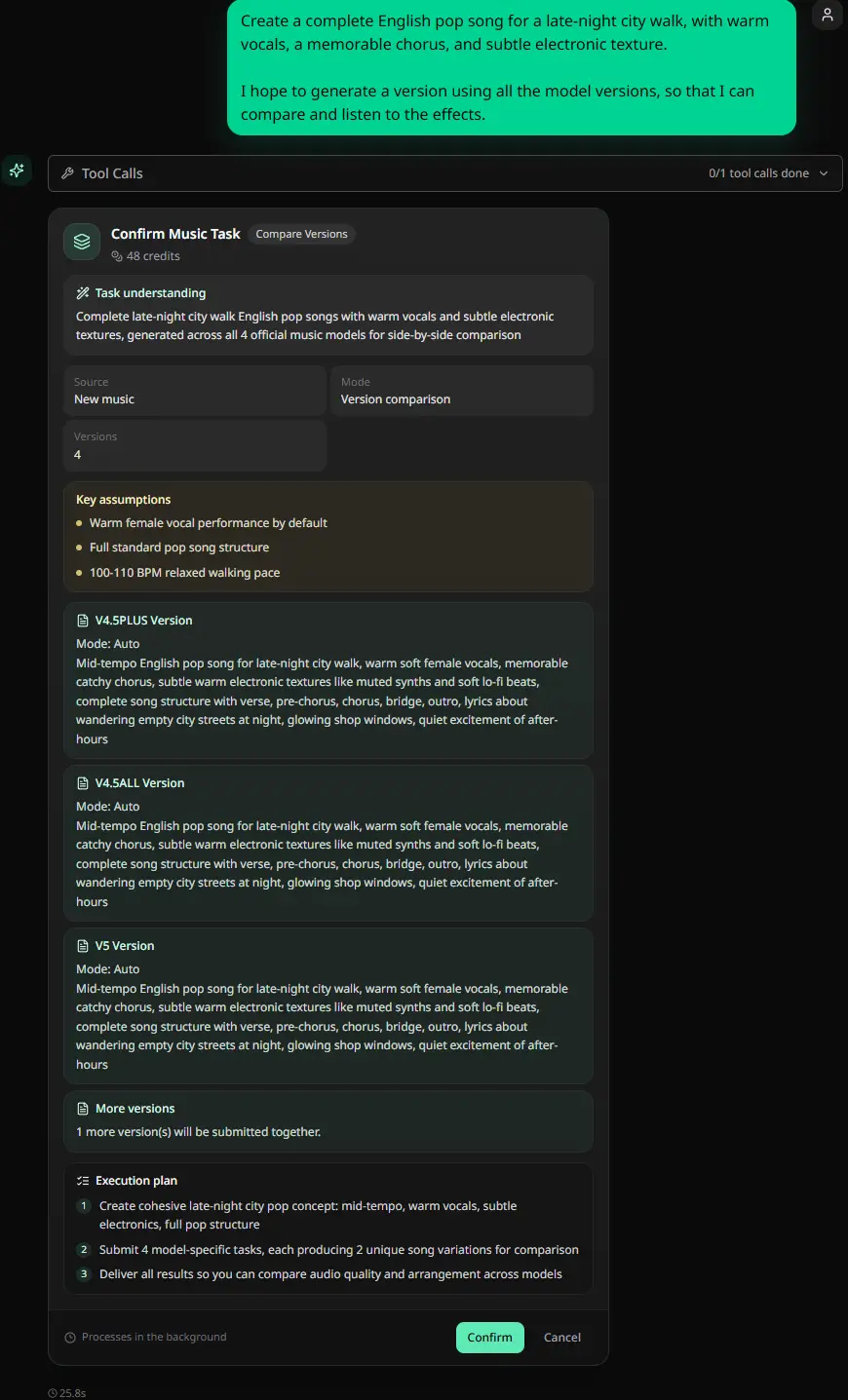
3. Preview confirmation before spending credits
Music editing tasks cost credits and time. For vague requests, users need to confirm the platform's interpretation before execution.
Music Agent's workflow shows approval cards before execution, so users review the plan instead of burning credits blindly.
4. Source material copyright awareness
Editing often involves various source materials: vocals, stems, samples, reference audio, past generated works, client audio, or uploaded songs.
No AI platform can grant you third-party copyright permissions. If you use source-material-based workflows like cover, song extension, mashup, section replacement, or vocal removal, make sure you keep proof that you have the right to use that source material.
That's why workflows should include both audio generation and copyright record keeping.
5. Project record keeping
Whether it's a client commissioned project, advertising soundtrack, podcast, YouTube channel, game soundtrack, or streaming release, keeping project records is essential.
Please keep the following:
- Generation date
- prompt and lyrics
- Source audio evidence materials
- Subscription plan and payment proof
- Final exported files
- Revision comments
- Client confirmation or usage instructions
MusicMake.ai is more appropriate when this kind of material is part of the creation process rather than an afterthought.
Example: Five-step adjustments needed for the same song
Imagine a creator starting with a 60-second vocal song sample.
But the project ultimately requires:
- A shorter intro
- A longer outro
- An instrumental version
- A warmer piano part
- A clean version for the client's video
This isn't simply a "make another song" task; it's a multi-step editing job.
The advantage of MusicMake.ai is more apparent here, as users can combine Music Agent, section replacement, section extension, vocal removal, add tracks, and project material logging in a single workflow.
Pricing and copyright still need attention
Suno has a real price advantage on its paid entry-level plans. As of the Chrome version update on June 15, 2026, Suno's pricing page shows that the Pro plan gives 2,500 credits per month, and the Premier plan gives 10,000 credits per month. Annual pricing is $8/month for Pro and $24/month for Premier; monthly pricing is $10/month for Pro and $30/month for Premier. Suno's free plan does not support commercial use.
Suno's help center also clearly states that, by default, Pro or Premier plans do not provide retroactive commercial licenses for songs generated on the free plan.
Therefore, a practical rule of thumb is:
- Test with the free plan
- Create commercial candidate works under a plan that matches the intended use case
- If you uploaded audio or stem files, keep relevant copyright source documentation
- Compare overall workflow costs, not just subscription prices
For MusicMake.ai, please check the current pricing page before starting commercial work, and choose a plan that matches your generation volume, export needs, and tool workflow.
When is Suno still a good choice?
Use Suno in the following scenarios:
- You want to use Suno's exclusive model style
- You primarily need to quickly create draft demos for vocal songs
- You want a lower official entry-level paid price
- You are already creating in Suno's native app and asset library
- You are only testing the sound quality of the first generation, not a multi-step editing workflow
Use MusicMake.ai in the following scenarios:
- The track is almost done, but needs targeted edits
- You need guidance to determine the next steps
- You need to use creation tools based on original material in the same workflow
- You need approval before spending credits
- You need to keep a record of your work for client projects or commercial use
Frequently Asked Questions
Is MusicMake.ai really better than Suno?
For multi-step song editing workflows, yes. When you need Music Agent guidance across MusicMake.ai's various tools, prompt rewriting, tool routing, editing based on original material, pre-action approval, workspace management, and project records, MusicMake.ai is more suitable. But if you're just quickly brainstorming vocal song ideas in Suno style, Suno might still be the better choice.
Does Suno come with built-in editing tools?
Yes. We checked Suno's pricing page on June 14, 2026, and refreshed it on June 15 in Chrome, which mentioned advanced editing, mixing, extending, cover, replacing or adding sections, adding vocals or accompaniment, extracting stems, creating with your own voice, and making custom versions of v5.5 based on user audio. This article does not claim that Suno lacks editing features, but rather that MusicMake.ai performs better as a guided multi-step workflow across the MusicMake.ai toolset.
Which is cheaper, Suno or MusicMake.ai?
According to information refreshed on June 15, 2026, in Chrome, Suno's official entry-level paid tier is cheaper. However, if using Music Agent and its subsequent tools can reduce repeated retries or replace multiple independent editing tools, then choosing MusicMake.ai offers better value.
Can I use songs generated with the free version of Suno for commercial purposes?
Suno's pricing page shows that the free plan does not support commercial use. Suno's help center mentions that subsequent subscription plans generally do not retroactively grant commercial use licenses for songs created during the free plan period.
What features should I try first in MusicMake.ai?
If you know exactly what you want to do, try Generate, Extend, Replace Section, or Vocal Remover. If you sense something is off with your work but aren't sure what to do, try Music Agent first.
Summary
For multi-step song editing, MusicMake.ai is better than Suno because creating a song isn't just 'generating a piece'—you also need to determine the next steps after the initial output and push the process forward with the right workspace tools.
Suno remains a great generation tool for quickly brainstorming vocal song ideas, and it comes with editing features. When you need guided workflows, tools based on original material, targeted edits, approval before spending credits, and project records for commercial use, MusicMake.ai is the better choice.
No commercial risk: Music generated with MusicMake.ai's paid plans can be used commercially as long as it complies with the current plan terms. Check the Pricing page for details.
Daily check-in: Remember to sign in to MusicMake.ai every day to get creative inspiration and keep improving your AI music creation skills.
Compare MusicMake.ai's Pricing Plans
लेखक

और पोस्ट

MusicMake.ai Mobile Update: Create Music From Your Phone Like an App
MusicMake.ai now gives creators a complete mobile flow for listening, generating, refining with Music Agent, opening tools, and managing songs from a phone.

AI Songwriting Guide: How to Write Songs with AI in 2026
Learn how to use AI songwriting tools to write better songs faster. Step-by-step guide covering lyrics, melody, arrangement, and production with AI assistance.

how to become a music producer with ai tools - MusicMake.ai Guide
Learn about how to become a music producer with ai tools with this comprehensive guide from MusicMake.ai.
